 CMS

Run every charger from one dashboard
Monitoring, control, pricing, finance reports and the checks that keep the money right, for networks of any size.
Everything you need to operate chargers at scale
Built for operators who want fewer site visits, fewer support calls, and clear numbers.
Live monitoring & alerts
Every connector’s status and live power on a map, with alerts for faulted or offline chargers and cars that overstay.
Remote control
Start or stop sessions, unlock connectors, change availability and reset chargers without a site visit.
Flexible tariffs
Per-kWh rates with peak hours, session fees and service charges. Price changes never alter past bills.
Load balancing
Cap a station’s total power so every charger can run on the supply the site actually has.
Driver wallets & RFID
Drivers charge from the driver app, a QR page on their phone or an RFID card, paying from a prepaid wallet.
Staff roles & permissions
Admin, operator, attendant, accountant, technician or view-only, limited to one host or chosen stations.
Your brand, your address
Your logo, colours and web address on the driver page and receipts, with your PAN printed on every receipt.
Charger diagnostics
Read every OCPP message, test a new charger model on site before you buy more, or try changes on a virtual charger.
GCOC control room
An overview wall, health matrix, incidents with playbooks and approved remote commands, and a tamper-evident audit log.
Financial analytics
Revenue, costs, profit and margin by day, week or month, by channel, station and Host, with period comparison and PDF or Excel download.
Host statements
Numbered monthly statements per Host, with receipts attached, published and emailed as PDF, then marked paid or settled through Fonepay.
Nine ready reports
Top-ups, sessions, revenue, payouts, wallet balances, bonuses and refunds, electricity cost, fleet invoices. CSV, Excel or PDF.
Connector QR stickers
Print or download a QR code for each connector, on your own domain with your logo, ready to stick on the charger.
Filters and safe editing
Filter Hosts, stations, chargers, tariffs, drivers and RFID cards, and never lose an edit: forms warn before you leave unsaved changes.
NEA tariff built in
Enter the NEA peak, normal and off-peak bands once; every bill applies the right band, plus your station rate and service charge.
Station receipt printers
Receipts print by themselves at the station, in Nepali and English, with a pay-by-QR code on unpaid walk-in bills.
Driver & Staff apps
Native iPhone and Android apps for drivers under your brand, and for attendants at the counter. See the apps.
Live battery %
See each car’s battery while it charges, and its start and end % on the receipt, when the charger reports it.
Screens show a demo operator with demo data.
A control room for the whole network
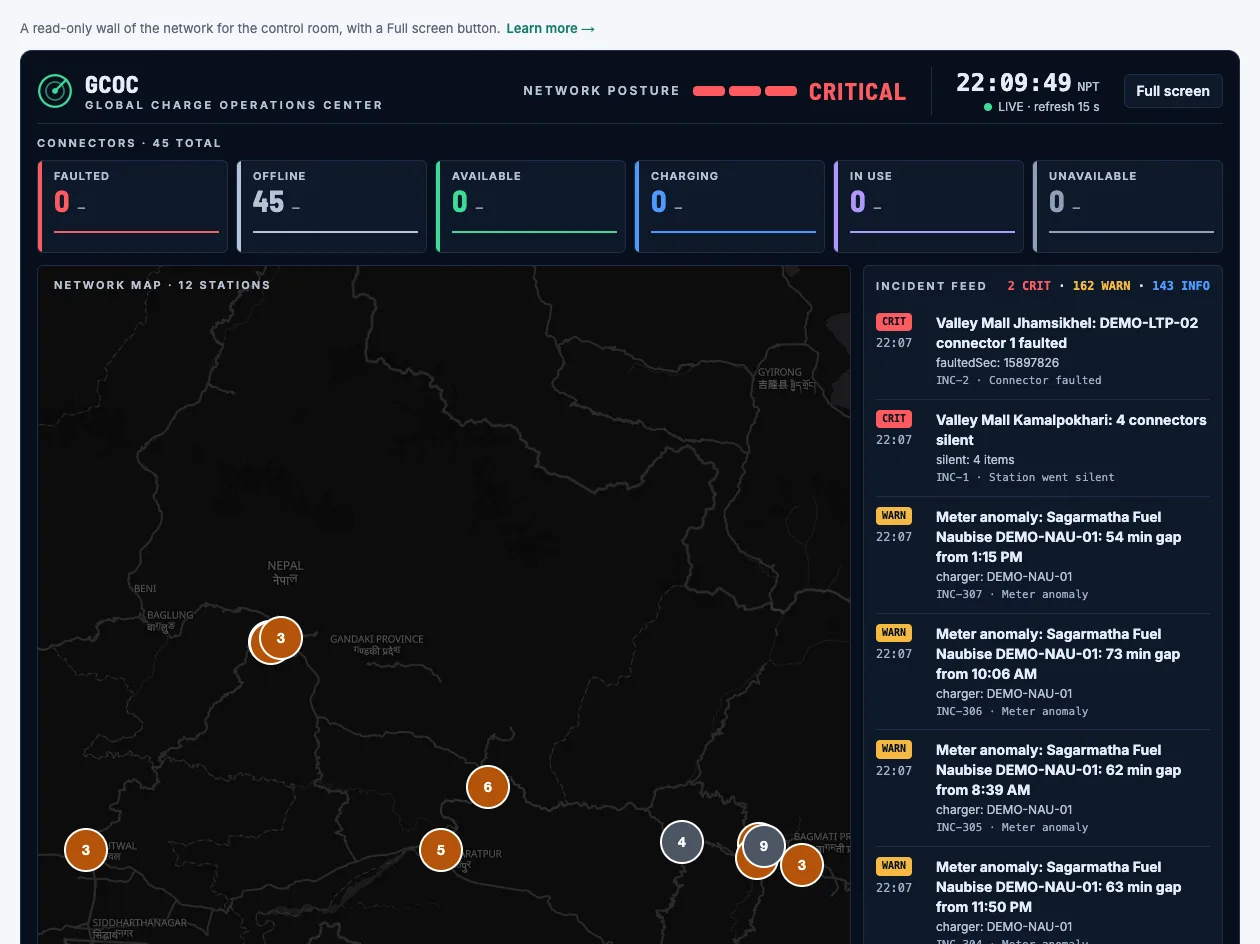
The Global Charge Operations Center turns alerts into incidents someone owns. Screens show a demo operator with demo data.
See the whole network at a glance
A read-only wall for the control room, with a Full screen button: network posture, connector counts, a map of every station and a live incident feed.
- Posture from Normal to Critical, refreshed every 15 seconds
- Map pins coloured by each station’s worst connector
- Health matrix by station, hour by hour
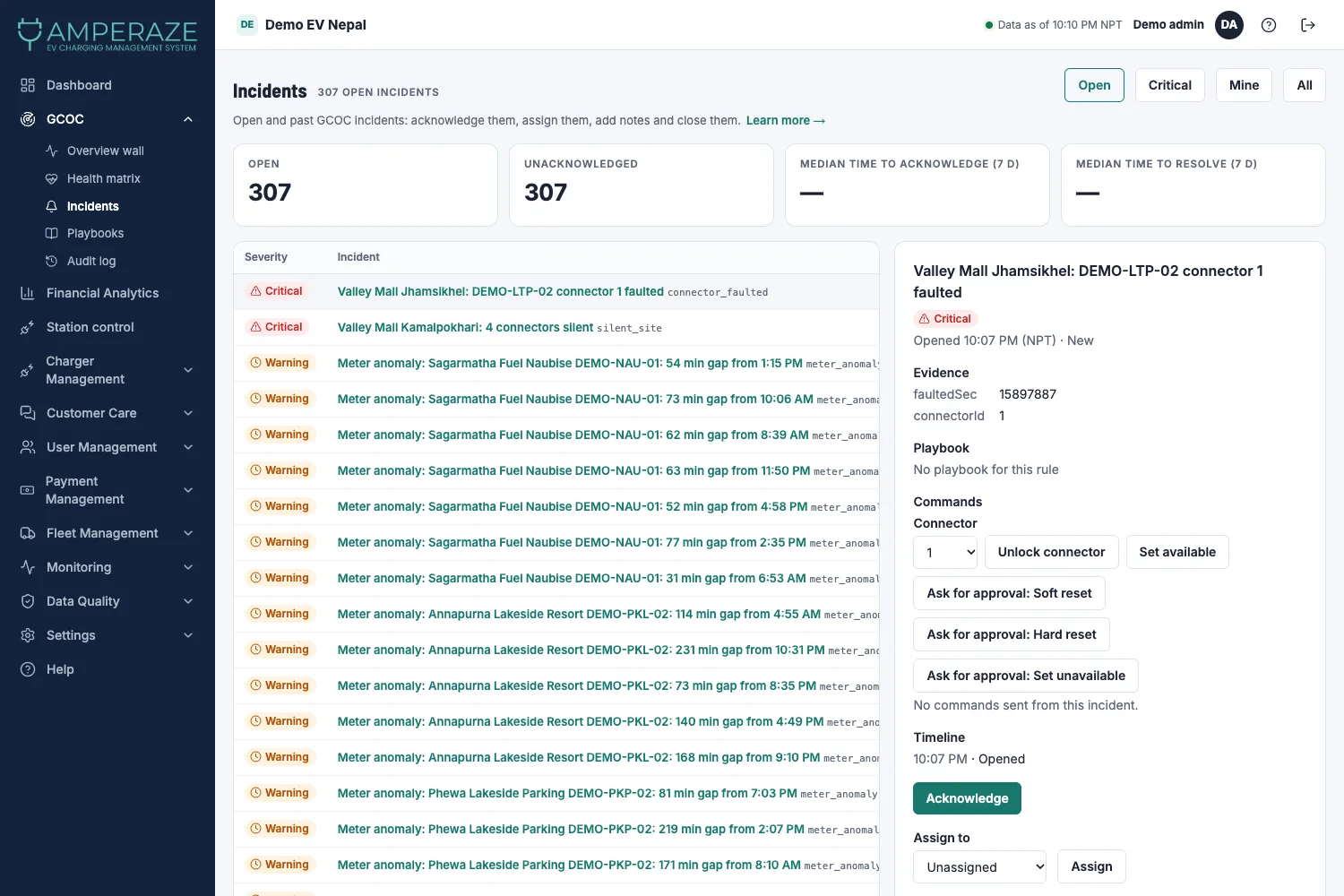
Every problem has an owner
Faulted connectors, silent stations, meter anomalies and bills waiting for review become incidents you acknowledge, assign, annotate and close.
- Playbooks: a checklist for each kind of incident
- Unlock or set available at once; soft reset, hard reset and set unavailable need an admin’s approval
- Hash-chained audit log of every action
What operators see every day
Real screens from the platform, shown with demo data.
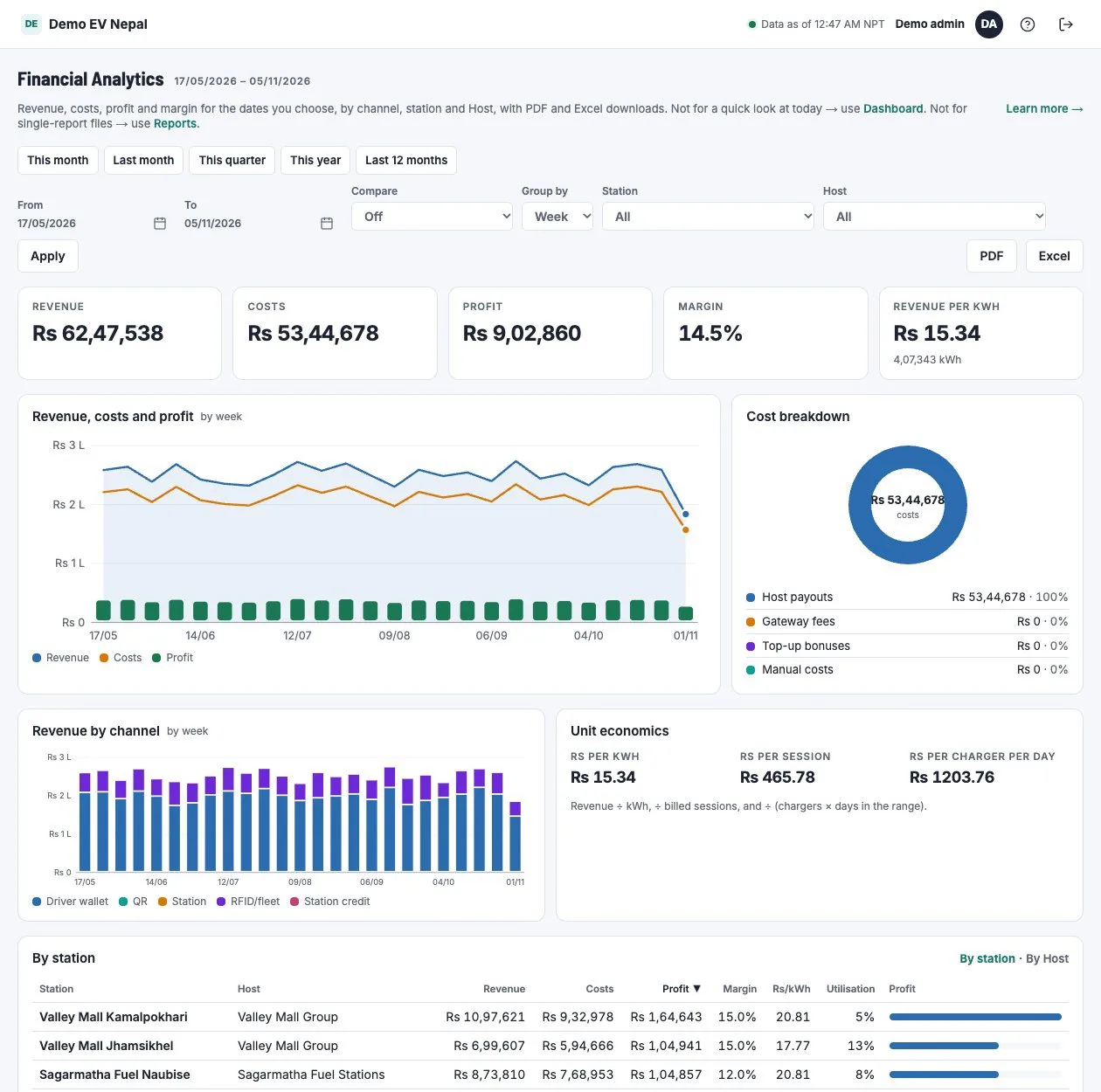
Know what the network really earns
Pick any date range, compare it with the last one, and see revenue, costs, profit and margin by channel, station and Host.
- Revenue, costs, profit, margin and revenue per kWh
- Unit economics per kWh, session and charger-day
- PDF and Excel download of what you see
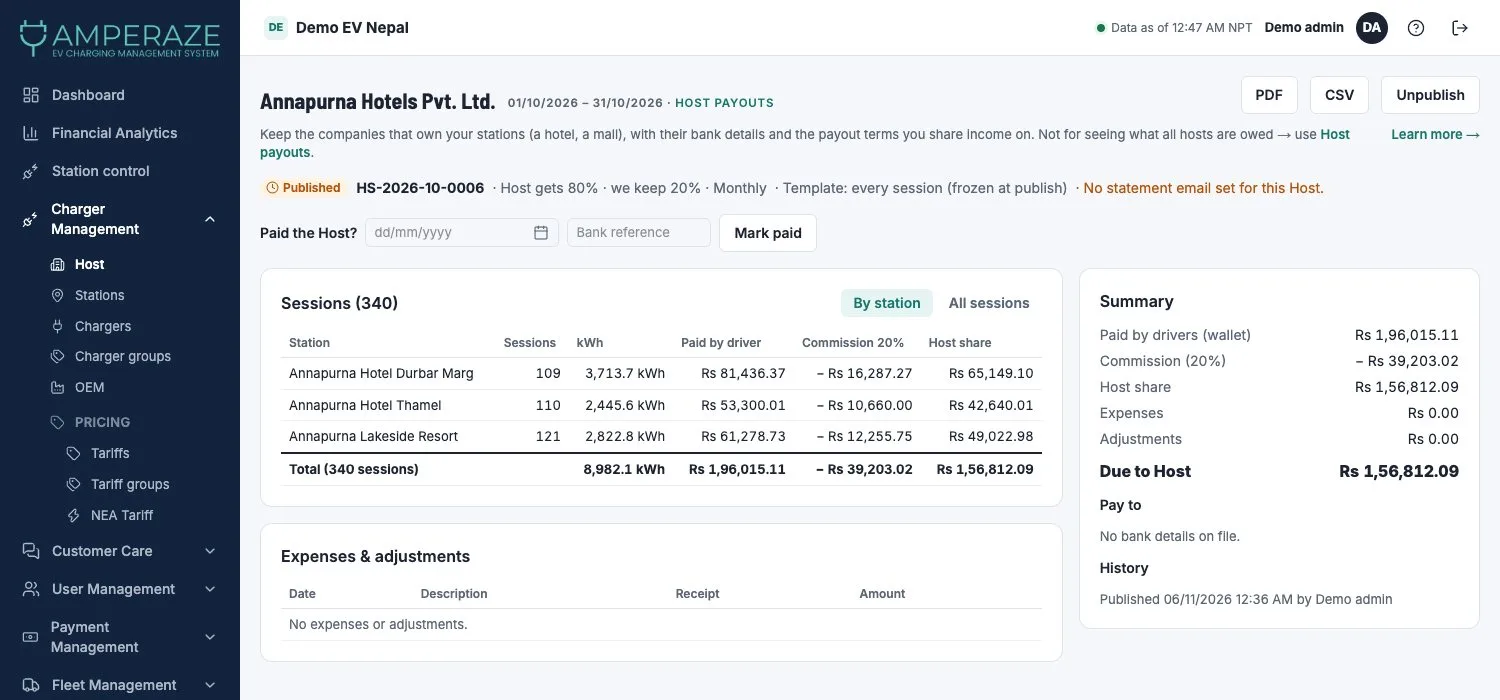
Statements your hosts can check
Every period end, a numbered draft is prepared for each Host. Add expenses and receipts, publish, and email the PDF.
- Draft, Published and Paid, with unpublish and carry-forward
- Receipts merged into the statement PDF
- Hosts pay off a negative statement through Fonepay
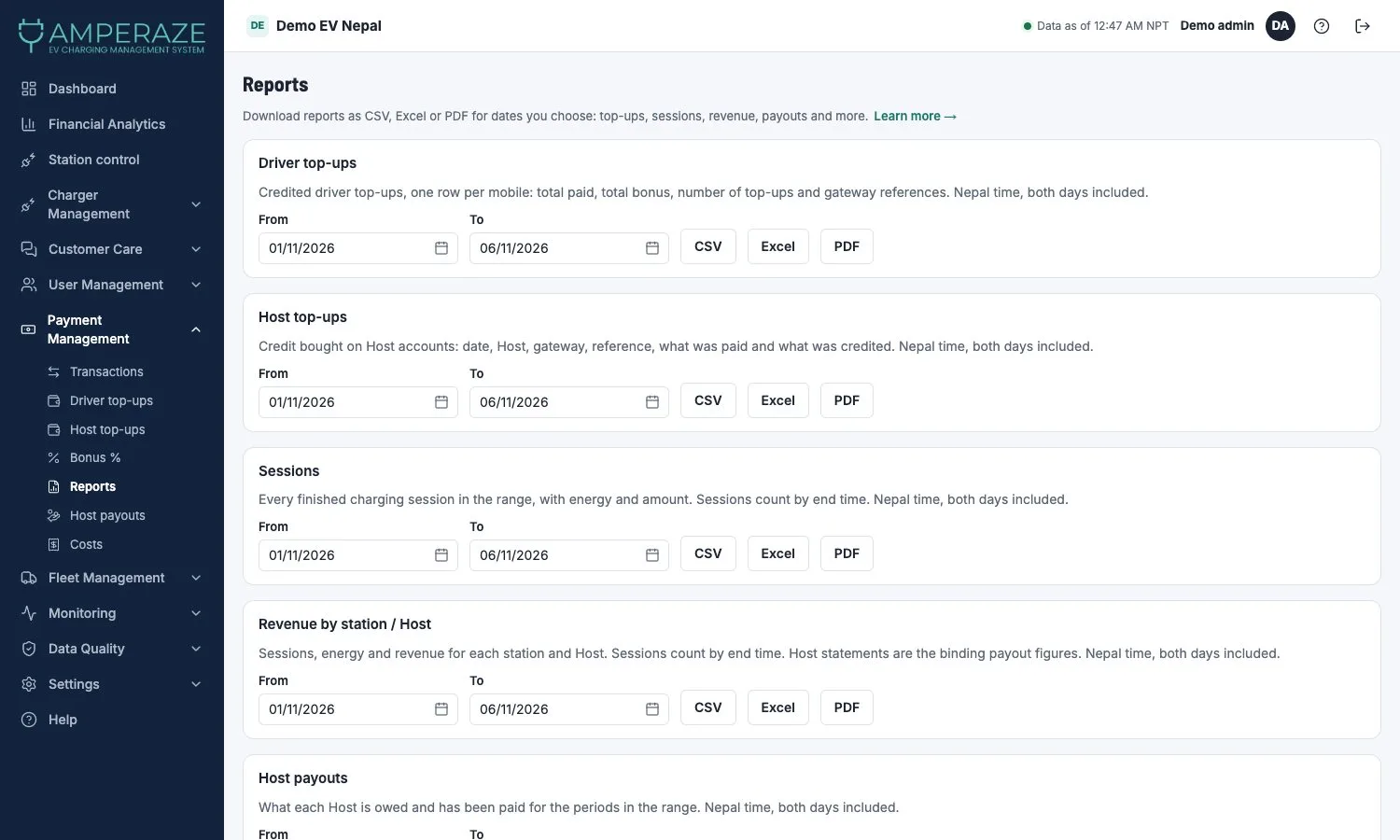
The files your accountant asks for
Nine reports for the dates you choose, each as CSV, Excel or PDF, from driver top-ups to electricity cost against revenue.
- Driver and Host top-ups, sessions, payouts
- Wallet balances, bonuses, refunds and fleet invoices
- Host logins get only their own reports
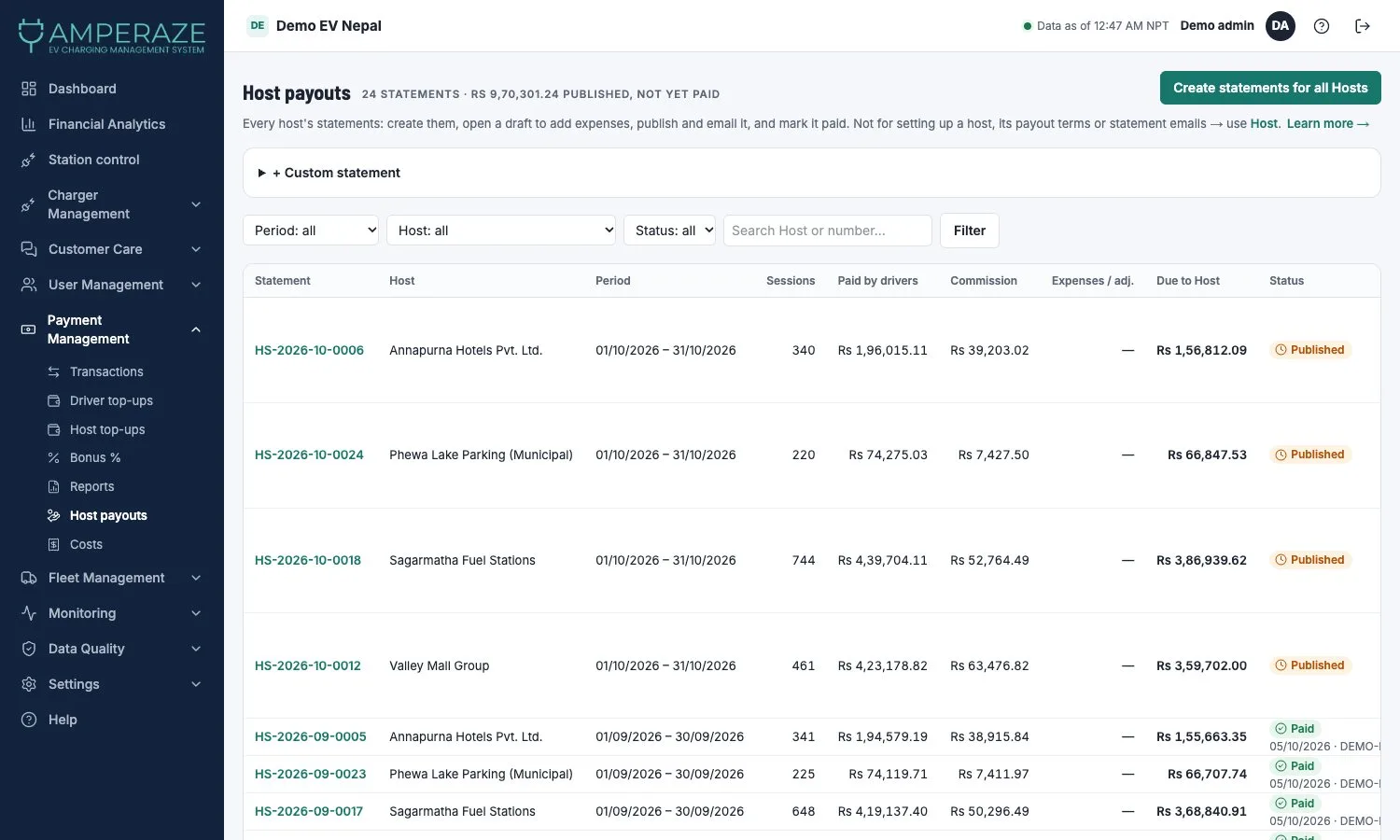
Every Host’s payout in one list
See what each Host is owed and has been paid, filter by period, Host and status, and create statements for all Hosts at once.
- Statement numbers like HS-2026-10-0006
- Filter by period, Host or status
- Dates shown as dd/mm/yyyy, with BS on receipts
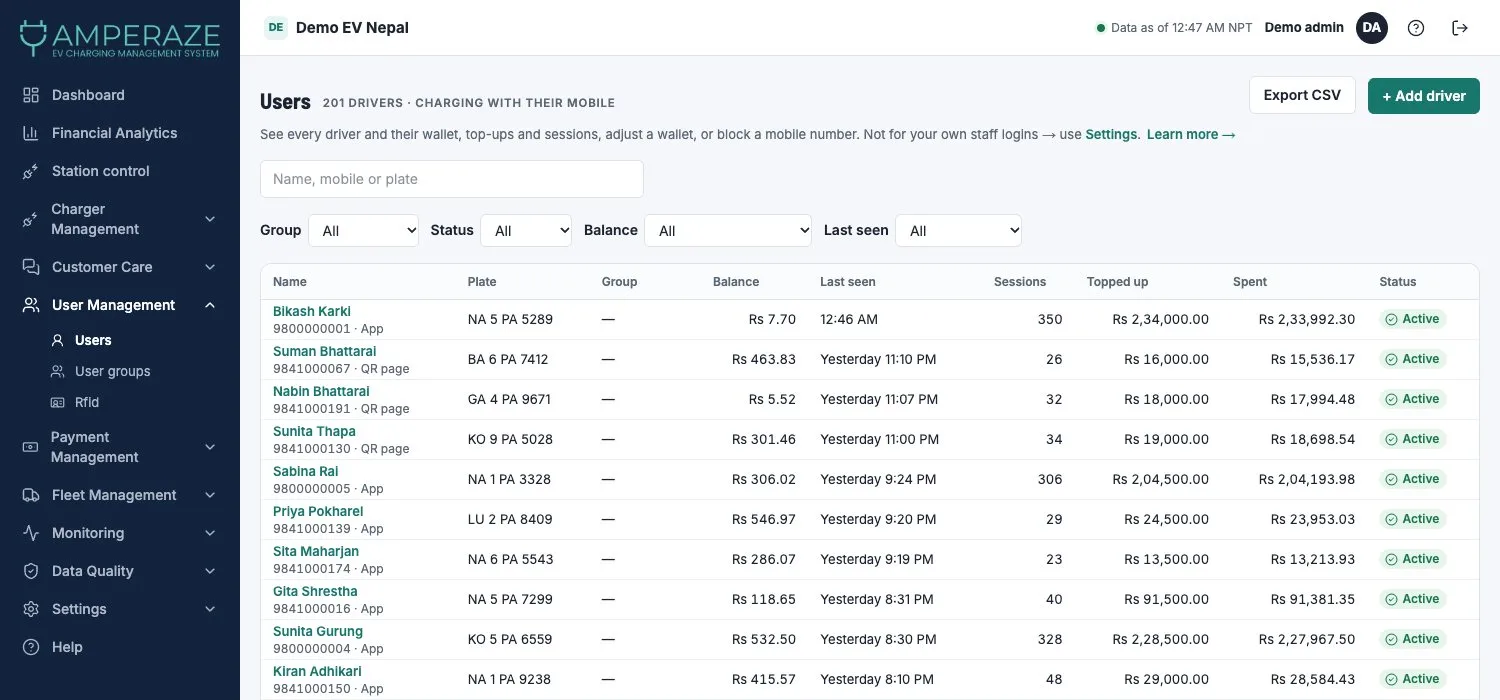
Find any driver in seconds
Filter drivers by group, status, balance or last seen, and export what you filtered. The same filters work on Hosts, stations, chargers, tariffs and RFID.
- Dropdown filters that stay in the web address
- Wallet balance, top-ups and spend per driver
- Block a mobile number with one click
Catch the bad bill before the driver does
Chargers drop offline, meters glitch and payments time out. CMS Nepal watches for all of it, so problems reach you, not your customers.
Bills held for review
When a bill looks wrong, it waits for a person to approve it instead of charging the driver.
Stuck and odd sessions
Sessions that go silent, and meter readings that jump or stall, are listed with the reason.
Daily reconciliation
Top-ups, wallets, bills and payments are checked against each other, and mismatches listed.
Payment gateway health
See at a glance if eSewa, Khalti or Fonepay top-ups have stopped coming through.
See it running on your own chargers
Book a walkthrough and we'll show you the dashboard with a live charger.
Request a demo